
A useful ChatGPT prompt is not necessarily long, clever, or packed with technical language. It is a clear handoff: it tells the assistant what job to do, supplies the information that matters, and defines what a satisfactory result should look like. When the first answer misses the mark, a good prompt also gives you a way to diagnose the problem and improve the next attempt.
If you are new to ChatGPT, our beginner’s guide to using ChatGPT effectively covers the fundamentals. This guide goes further. It focuses on practical techniques for making prompts more precise, reducing avoidable revisions, and checking whether the result actually meets your needs.
OpenAI’s own prompting best practices for ChatGPT emphasize clarity, specificity, and iterative refinement. Those principles are a starting point, not a magic formula. Different tasks need different instructions, and no prompt can guarantee that a model will be correct.
1. Define success before you write the prompt
Before asking ChatGPT to produce something, decide what you will count as a good result. If you cannot describe the desired outcome, the assistant has to guess—and you may end up correcting assumptions that could have been avoided.
For a short explanation, success might mean that a beginner can understand the idea without specialist terminology. For a research summary, it might mean that every factual claim is traceable to a supplied source and that uncertainty is clearly marked. For a spreadsheet task, success might mean a table with specified columns and no extra commentary.
Turn that standard into an acceptance checklist. For example:
- The answer must address the question directly.
- It must use only the information in the supplied document for document-specific claims.
- It must separate confirmed facts from interpretation.
- It must use the requested structure.
- It must identify missing information instead of inventing it.
You do not need to include a long checklist in every prompt. Use criteria that materially affect the result. A simple question needs little scaffolding; a deliverable that will be published, shared with a client, or used to make a decision deserves more precise requirements.
2. Give the task a clear boundary
Prompts often become less effective when they ask for too many different deliverables at once. “Research this company, compare all its products, write a marketing plan, draft five social posts, and build a budget” contains several jobs, each with its own evidence and format requirements.
Define one main deliverable first. If the work naturally divides into stages, ask for the stages in order. You might first request a comparison framework, then supply the information, then ask for a recommendation, and finally request a polished summary. This makes it easier to spot a weak assumption before it spreads into the final output.
A bounded prompt is not the same as a short prompt. It can contain substantial context, but the central task should remain unmistakable.
Less useful: “Tell me everything about electric cars.”
More useful: “Write a 700-word buying guide for a first-time electric-car buyer. Explain charging at home, public charging, winter range, and total ownership costs. Focus on practical trade-offs, not brand rankings. Flag costs that vary by country rather than guessing a price.”
The second prompt narrows the audience, purpose, length, and coverage. It also identifies a common source of error: costs that depend on location.
3. Add only the context that changes the answer
Background information can improve a response, but dumping every available detail into a prompt can bury the important facts. Choose context based on the decision the assistant must make.
For a customer email, relevant context may include the customer’s problem, what has already been tried, and what you are authorized to offer. For a lesson plan, it may include the learners’ age, prior knowledge, lesson duration, and available materials. For a product comparison, it may include budget, use case, required features, and deal-breakers.
A useful test is to ask: Would the answer change if I removed this detail? If not, the detail may not belong in the prompt.
When the context is long, label its parts. Headings such as “Background,” “Task,” “Constraints,” and “Source text” make the request easier to scan. If you paste a document for analysis, clearly separate your instructions from the document itself so the assistant can distinguish the material to examine from the task you are assigning.
4. Specify the audience and level of expertise
The same subject can require very different explanations. A developer debugging an API needs different terminology from a manager deciding whether to fund a software project. A school student may need a concrete analogy before an abstract definition.
Instead of asking for a generic tone, describe the reader and the purpose.
Example prompt:
Explain retrieval-augmented generation to a product manager who understands basic software concepts but does not build machine-learning systems. Use one realistic business example, define specialist terms on first use, and finish with three limitations to consider before deployment.
This instruction gives ChatGPT a basis for selecting detail. It does not merely say “make it simple,” which can lead to a vague or oversimplified answer. If you need technical depth, say which concepts the reader already understands and which need explanation.
5. Make the output format testable
Requests such as “make it professional” or “organize it well” leave considerable room for interpretation. When structure matters, state it explicitly.
You can specify headings, a word range, a table’s columns, the number of recommendations, or whether the answer should contain only the requested artifact. For example:
Compare the three proposals in a table with these columns: estimated cost, delivery time, main benefit, main risk, and information still missing. After the table, give a recommendation in no more than 150 words. Do not treat missing figures as zero.
A defined format is especially useful when you intend to copy the result into a report, spreadsheet, content-management system, or project document. It also makes review easier: you can check whether each required element is present instead of judging the answer only by its fluency.
Avoid arbitrary precision when it does not help. A strict word count may be useful for a submission, but a request for exactly 17 bullets is unnecessary unless the number serves a purpose.
6. Show an example when style or structure is hard to describe
Sometimes an example communicates your expectations better than several paragraphs of explanation. This approach is often called few-shot prompting: you provide one or more examples of the input and the kind of output you want.
Suppose you need consistent product descriptions. Give ChatGPT one approved description and ask it to follow the same structure for a new product. Tell it which features are fixed—the order of sections, approximate length, and level of detail—and which should change with the product.
A useful instruction might be:
Follow the structure of the example below, but do not reuse its factual details or wording. Keep the same order of sections and similar sentence length. If the new product information does not support a claim, omit the claim rather than filling the gap.
Examples are most valuable when the desired pattern is difficult to express abstractly. They are less necessary for straightforward tasks, and poor examples can teach the wrong pattern. Check that the example demonstrates what you actually want, not merely what you happened to write first.
7. Replace vague prohibitions with useful alternatives
Negative instructions can be important, but a list of things not to do may leave the assistant unsure what to do instead.
Instead of writing “Don’t be wordy,” say “Use short paragraphs and remove repeated points.” Instead of “Don’t make up sources,” say “Use only the sources supplied below; attach a source to each factual claim and write ‘not established by the sources’ when evidence is missing.” Instead of “Don’t sound robotic,” describe the target: “Use natural professional English, specific verbs, and no exaggerated claims.”
This does not mean every prohibition should be removed. Some boundaries—such as not inventing data or not disclosing confidential information—should remain explicit. The improvement is to pair a boundary with an actionable behavior whenever possible.
8. Ask for evidence and uncertainty when facts matter
ChatGPT can produce a convincing explanation that contains an error. Clear prompts can help you demand better evidence, but they cannot guarantee factual accuracy.
For research-oriented work, tell the assistant which sources it may use, what counts as evidence, and how it should handle gaps. If you provide a report, ask it to cite page numbers or section headings. If it uses web research, request links to primary sources where possible and ask it to distinguish a source’s actual claim from its own interpretation.
Try this pattern:
Answer the question using the supplied report and the official documentation linked below. For each important factual claim, identify the supporting source. Separate documented facts from your analysis. If the evidence is incomplete or the sources disagree, explain the uncertainty instead of choosing a convenient answer. Do not invent quotations, citations, or statistics.
Then verify important claims yourself. A link can be irrelevant, outdated, or weaker than the statement it is attached to. For legal, medical, financial, safety, and other consequential decisions, use qualified sources and professional judgment rather than treating an AI response as the final authority.
9. Improve a weak answer by diagnosing the failure
When ChatGPT gives you an unsatisfactory response, “try again” may produce a different answer without addressing the reason the first one failed. Identify the failure category before revising the prompt.
- It misunderstood the task: Restate the main deliverable in one sentence.
- It missed relevant context: Supply the missing facts and explain how they affect the answer.
- It was too general: Ask for a concrete example, a defined comparison, or a step-by-step procedure.
- It made unsupported claims: Require evidence, uncertainty labels, or a narrower source set.
- It ignored the format: Provide a small sample of the required structure and ask for a corrected output.
- It was too long: Set a length range and identify which details should be prioritized.
- It made an assumption: Name the assumption and tell it what to do when information is unavailable.
You can also ask ChatGPT to critique the result before rewriting it:
Compare your answer with the requirements in my original prompt. List any missing requirements, unsupported assumptions, and repeated points. Do not rewrite it yet.
Review that critique, then request the corrections you actually want. This creates a more controlled revision process than asking for a general improvement.
10. Use follow-up prompts to change one thing at a time
When a response is close to what you need, avoid changing every requirement at once. Give a targeted follow-up that preserves the parts already working.
For example:
- “Keep the analysis and recommendation unchanged, but rewrite the introduction for a nontechnical reader.”
- “Retain the table. Add a column for evidence quality and leave the value blank when the source provides no evidence.”
- “Shorten this to 400 words without removing the limitations or the two examples.”
- “Check the calculations again and show the formula used for each total.”
Changing one dimension at a time makes it easier to judge whether the revision helped. If the conversation has become tangled with many competing instructions, restate the current task and paste the latest version of the material that should be edited. That reduces the chance of carrying forward an outdated requirement.
11. Build reusable prompt patterns, not one giant master prompt
If you repeat a task regularly, save a small prompt template with clearly marked fields. A reusable template should contain the stable instructions while leaving room for the facts that change each time.
For a research summary, the template might ask for the question, audience, permitted sources, required sections, uncertainty handling, and length. For editing, it might specify the intended reader, tone, changes allowed, facts that must remain unchanged, and the format of the final version.
Keep templates focused on a particular job. A single master prompt that attempts to govern research, coding, translation, marketing, data analysis, and every other task can become contradictory and difficult to maintain. Separate templates are easier to test and update.
If a template is used for important work, test it against several examples where you already know what a good answer should contain. Record recurring failures and revise the relevant instruction. OpenAI’s ChatGPT Enterprise Prompting Guide similarly recommends scoping the problem, structuring instructions, iterating, and adding checks for accuracy. Its examples are useful patterns, not a guarantee that every prompt will behave identically across models or accounts.
12. Use a practical prompt blueprint
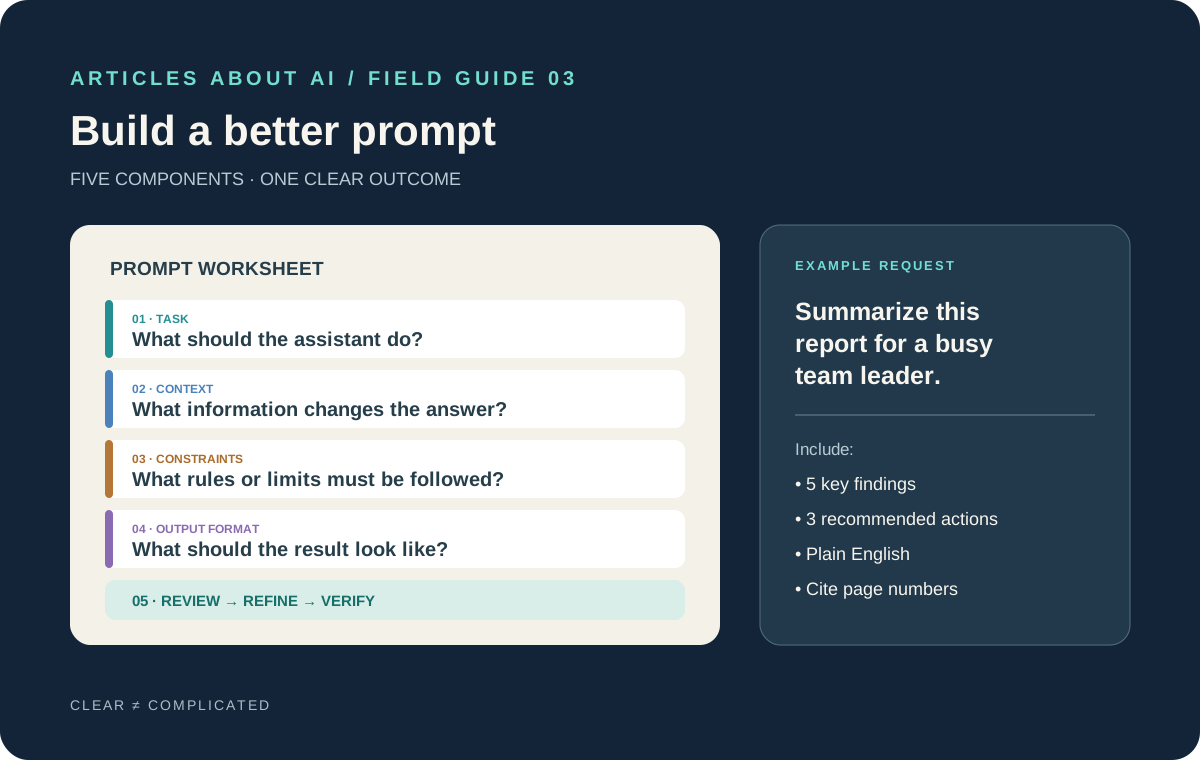
For a complex task, combine the techniques above into a prompt with five parts. Adapt the structure to the job; do not add sections that do not matter.
Task: What single result do you need?
Context: What background, audience, or source material should shape the response?
Constraints: What must be included, avoided, preserved, or treated as unknown?
Output format: What should the finished answer look like?
Review criteria: What should be checked before the answer is considered complete?
Here is a reusable example:
Task: Summarize the attached project report for a team leader who must decide what to do next.
Context: The reader has five minutes and understands the project’s goals but has not read the report.
Constraints: Use the report as the source for project-specific facts. Do not invent dates or budgets. Separate confirmed findings from recommendations and flag missing information.
Output format: Start with a 100-word executive summary, followed by five key findings and three recommended actions. Cite the relevant report page for each finding.
Review: Check that every recommendation follows from the evidence, that the summary does not introduce new claims, and that all requested sections are present.
For a simple question, this blueprint is unnecessary. For a report, research task, or work product with several requirements, it creates a compact specification that you can inspect and improve.
Common prompting mistakes to avoid
Adding detail without adding direction. More words do not automatically produce better answers. Include details that influence the result, and remove unrelated background.
Asking for certainty instead of evidence. “Be 100% accurate” does not make a model infallible. Specify sources, uncertainty handling, and verification steps.
Giving conflicting instructions. “Be exhaustive” and “answer in two sentences” may pull in different directions. Decide which requirement takes priority.
Treating a polished answer as a verified answer. Fluency is not proof. Check citations, calculations, dates, and claims that matter.
Reusing an old prompt without checking it. Models, interfaces, and task requirements change. Review saved templates when they start producing inconsistent or outdated results.
The takeaway
Writing better ChatGPT prompts is less about discovering a secret phrase than making the work easier to understand and evaluate. Define the task, supply relevant context, set meaningful constraints, specify the output, and decide how to check the result. When an answer fails, diagnose the failure and revise the instruction that caused it instead of adding more words at random.
Start with one recurring task—a report summary, an email draft, a study explanation, or a product comparison. Save the prompt, test it on a few examples, and improve it based on the errors you observe. Over time, a small collection of well-tested prompts will usually be more useful than a long collection of generic templates.